Ubuntu Internet Sharing
I have this specific configuration wherein I have a PC (urop) with two network interfaces. One connected to the internet. Second network interface connected to another PC (tx2). I can access internet on urop. I can ssh to tx2 from urop.
I want to accomplish the following. To access the internet from tx2. tx2 need not be accessible from the internet. This blog gives a solution to exactly this.
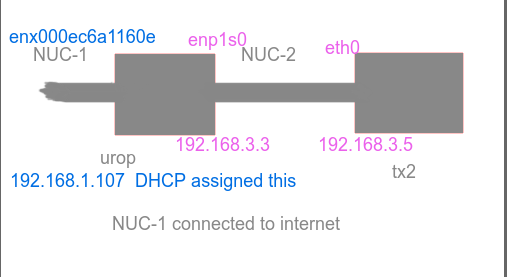
The idea is to enable ip forwarding on urop. On tx2 set the gateway and nameserver.
On urop:
tx2:sudo ip route add default via 192.168.3.3 dev eth0 echo “nameserver 8.8.8.8” > /tmp/resolv.conf sudo mv /tmp/resolv.conf /etc/
How to set static ip address at boot time:
Edit file /etc/network/interfaces
on urop (i7)
auto enp1s0 iface enp1s0 inet static address 192.168.3.3 netmask 255.255.255.0
on tx2 auto eth0 iface eth0 inet static address 192.168.3.5 netmask 255.255.255.0 gateway 192.168.3.3 dns-nameservers 8.8.8.8 dns-nameservers 8.8.4.4
Credit: Mr. Arpit Tolani (Principal Technical Support Engineer at Red Hat Inc. in Pune)